Amazon's Selling Partner MCP lets you run your Seller Central account from an AI assistant, but it only works with Claude (and Amazon's own Quick assistant). Aakaar MCP is a standard MCP server, so it works with Claude, ChatGPT, Grok, Copilot and other AI tools that support remote MCP servers, such as Cursor and Gemini. It also covers PPC, listing updates and Amazon Marketing Cloud (AMC).
If you want to analyze and run Amazon from the AI you already use, this guide compares the two. It covers what Amazon's MCP is, when it launched, what it does and where it stops, then what Aakaar MCP adds.
Key facts, as of November 16, 2026
- What it is: Amazon's Selling Partner MCP, which Amazon calls the Selling Partner plugin, connects Seller Central data to an AI assistant. Amazon announced it on September 23, 2026.
- Who can use it: sellers in Amazon's US stores, in beta, with a Professional selling plan. Access is rolling out with a waitlist.
- Which AI tools: Amazon Quick and Claude (beta). Amazon says more integrations will follow.
- What it covers: sales, inventory, traffic and listings data, plus listing updates and FBA inbound plans with your approval.
- Cost: Amazon has not announced a fee for the plugin.
- Aakaar MCP: works with Claude, ChatGPT, Grok, Copilot, Cursor and Gemini, adds PPC, AMC and Vendor Central, and starts at $199 a month with a 14-day free trial.
What is an Amazon MCP?
MCP stands for Model Context Protocol, an open standard that lets an AI assistant connect to outside data and tools. An Amazon MCP is a connector between your AI assistant and your Amazon account, so the AI can answer from your live data and, with your approval, make changes.
You do not log in to an MCP like a dashboard. You connect it once to Claude, ChatGPT or another AI tool, then ask questions in plain language.
What is the Amazon Selling Partner MCP, and when did it launch?
The Amazon Selling Partner MCP is Amazon's own connector between Seller Central and an outside AI assistant. Amazon announced it on September 23, 2026, at Amazon Accelerate, as part of its Seller Assistant plugin. We covered the rest of the event in our Amazon Accelerate 2026 recap. It launched with Amazon Quick and in beta with Anthropic's Claude. Amazon says 90% of its selling partners already use third-party AI tools, and that more integrations will follow.
Amazon's own name for it is the Selling Partner plugin. In Claude, sellers open the plugin directory, search for the Selling Partner plugin and install it, then sign in with their Amazon selling account and review what it can access. Amazon says setup takes about a minute and needs no code.
It is currently in beta for sellers in Amazon's US stores, and Amazon has said international expansion will follow. Access is rolling out over time, so some sellers are added to a waitlist first, and the account needs a Professional selling plan.
What does the Amazon Selling Partner MCP cover?
It brings your live Amazon selling data into the AI assistant, along with Amazon selling skills that interpret sales trends, manage inventory and optimize listings. Amazon lists sales and revenue, inventory levels and health, traffic and conversion metrics, listings health and compliance status, and listing information and optimization opportunities, and says the information available will expand over time. Actions need your approval by default, and you can limit the assistant to answers only.
Amazon's help page gives examples of what you can ask:
- Sales and traffic: what were my sales last week, or how is my traffic trending over the last 8 weeks
- Inventory: which ASINs are at risk of stocking out, and when to restock and how much
- Listings: show listings with errors or that are suppressed, or update the bullet points on a SKU, which the assistant proposes for your approval
- Pricing and fees: the price needed to win the Featured Offer, the competitive landscape for an ASIN, and fee estimates at a price you choose
- Inbound shipments: start an FBA inbound plan, and check prep requirements for ASINs
- Selling documentation: how programs such as Subscribe and Save work
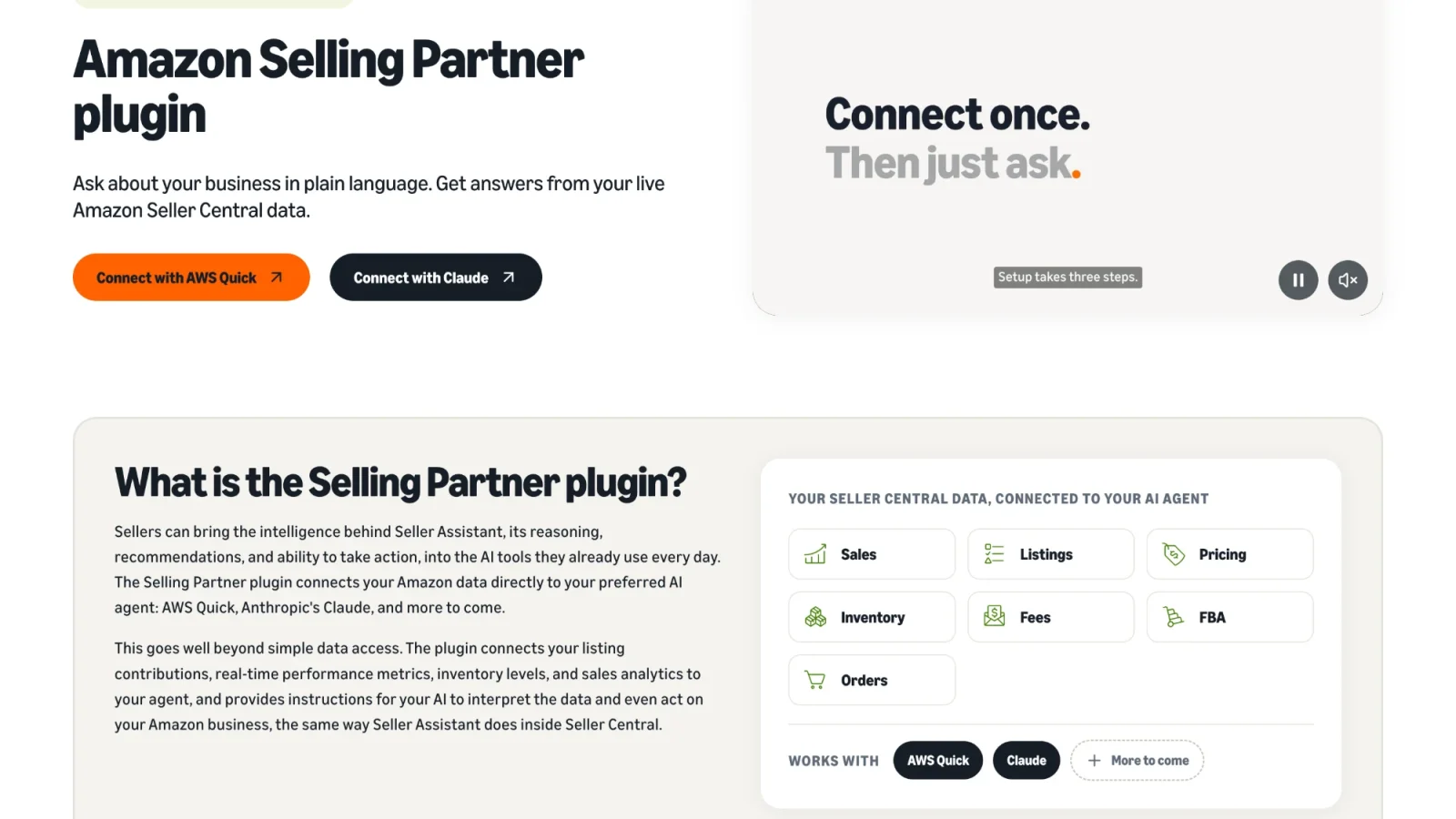
You ask in plain language, and the assistant answers from your own business data.
Where does the Amazon Selling Partner MCP stop?
The Selling Partner MCP is useful for managing one Seller Central account, but it has clear limits today:
- Only Claude and Amazon Quick. It does not work with ChatGPT, Grok, Copilot, Cursor or Gemini. Amazon has said more AI tools will follow, but it has not named them.
- US stores only. It is in beta for sellers in Amazon's US stores, with no date for other marketplaces. Access is rolling out over time, with a waitlist.
- Seller Central only. Amazon's help page lists sales, inventory, traffic and listings data, and does not mention Vendor Central or advertising data. Amazon has a separate Amazon Ads MCP Server for advertising, with its own setup.
- One seller account. Amazon describes a seller connecting their own Seller Central account, and has not described multi-account use.
- No profit view. Amazon's list of available information does not include profit by product, ad spend or cost of goods.
- No AMC. Amazon's announcement does not mention Amazon Marketing Cloud.
Amazon also notes that once you connect, your data is processed by your AI assistant under that assistant's terms, and you are responsible for the actions the agent takes. It recommends opting out of model training in your assistant's privacy settings.
Because it is a beta, these details may change. Check Amazon's announcement and help page for the latest. Details checked on November 16, 2026.
Amazon has three official MCP servers
When people say "Amazon MCP", they can mean one of three different things:
- Selling Partner MCP: Seller Central data and approved changes, in beta for Claude and Amazon Quick. This is the one compared in this post.
- Amazon Ads MCP Server: advertising data and campaigns, in open beta since February 2, 2026. It needs Ads API access. See our Amazon unBoxed 2026 recap for how Amazon positions it.
- Local SP-API MCP: a developer tool announced in May 2026 for building on Amazon's Selling Partner API.
Each one is a separate connection with its own setup. Aakaar MCP brings Seller Central, PPC, listings and AMC into one connection.
What does Aakaar MCP do?
Aakaar MCP connects your Amazon account to the AI you already use. It is a standard MCP server, so it works with Claude, ChatGPT, Grok, Copilot and other AI tools that support remote MCP servers, such as Cursor and Gemini. You pick the AI and Aakaar supplies the Amazon data and actions behind it. Think of it as an Amazon MCP server with built-in intelligence: Aakaar's skills and prompts sit on top of the Selling Partner API, Ads API, Brand Analytics and AMC.
Here is what you can do with it:
- Run PPC. Review campaigns, ad groups, ads and targets, then create or update them, change bids and budgets, and check budget usage, day parting and change history. Ads data covers Sponsored Products, Sponsored Brands, Sponsored Display and DSP.
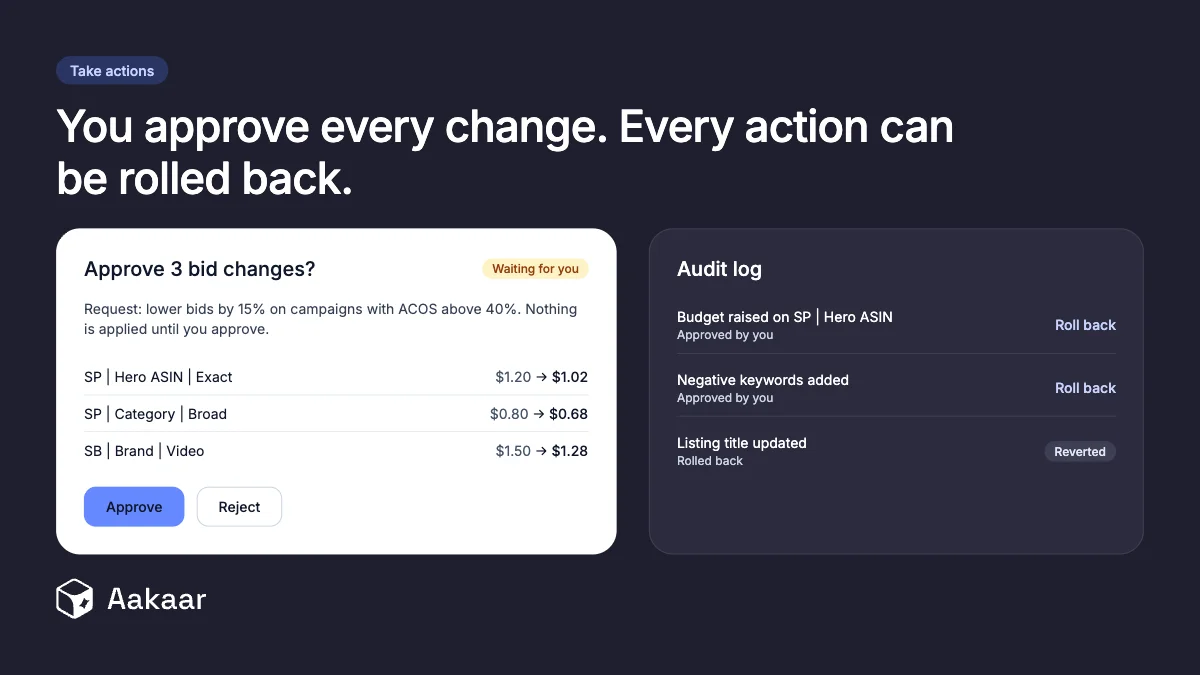
- Take actions. Ask your AI to make the change, not just describe it. Writes run only after you approve them, and every action is logged and can be rolled back.
- Optimize listings. Pull up a listing, find what to improve, then update its content, images and price.
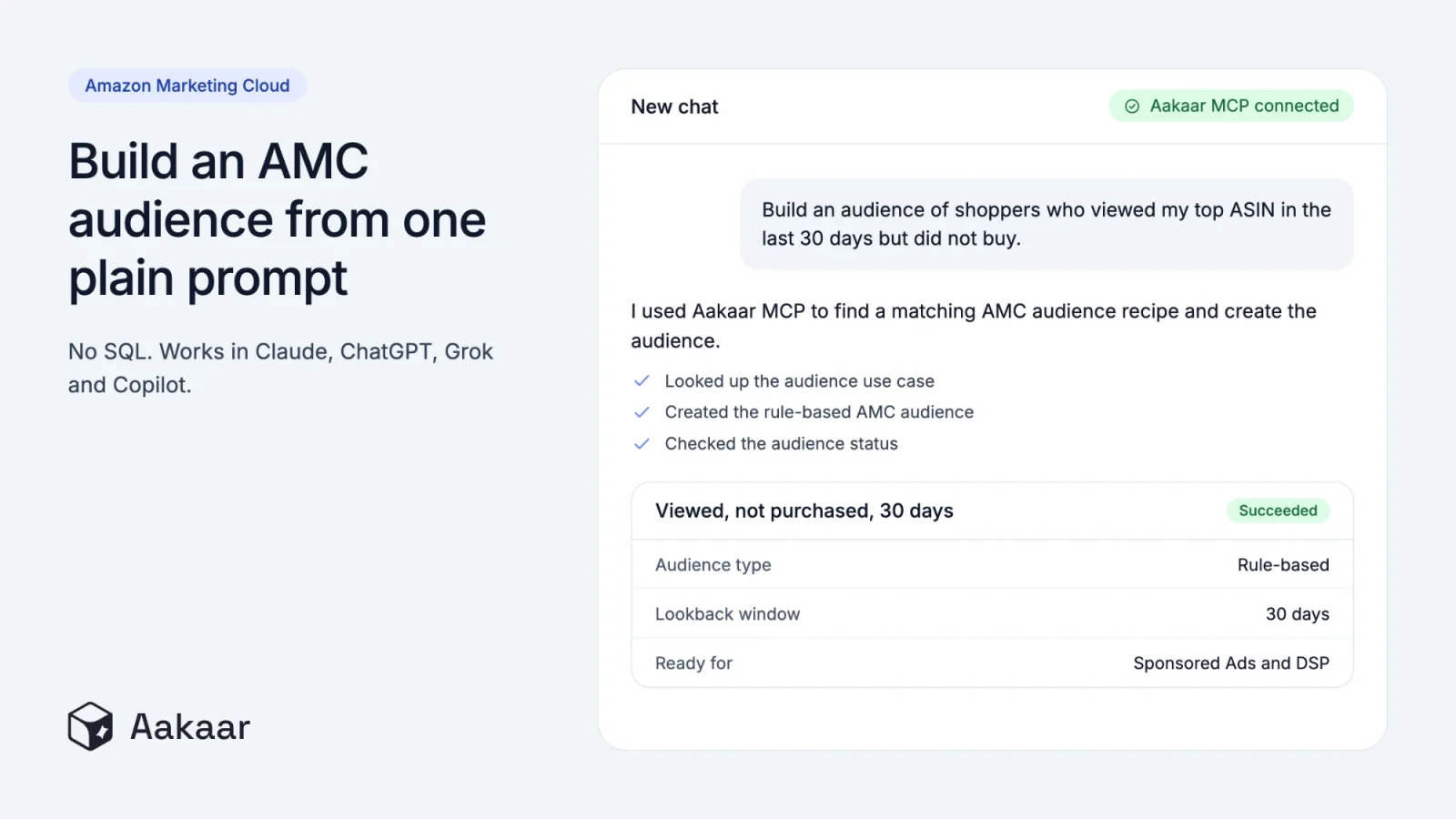
- Use AMC. Run Amazon Marketing Cloud queries and workflows, and build audiences, including lookalike audiences, without writing SQL yourself.
- See profit and account health. Review profit and loss with fees, ad spend and cost of goods, plus orders, returns, promotions, Brand Analytics and your Account Health report.
- Cover Seller Central and Vendor Central. Review vendor sales, inventory and purchase orders, and update vendor listing content, images and prices.
- Run it across brands. Agencies get per-brand setup and data isolation, and the Scale plan adds multi-marketplace routing.
- Keep access tight. Sign-in uses OAuth 2.1 and is limited to the MCP, never billing or settings. Each account's data is kept separate, and every prompt and tool call is logged and can be exported.
For PPC that runs without prompting, see our AI PPC Agents. Because it is not tied to one AI, you can switch tools without losing your setup. Use Claude for a PPC audit, ChatGPT for keyword harvesting, and Grok to analyze a listing.
Free ready-made prompts to run with Aakaar MCP
Aakaar MCP comes with a free library of 20+ ready-made prompts. Each one tells your AI what data to pull and what to build, such as a dashboard or a report you can read in the chat.
- PPC: PPC audit dashboard, placement performance report, dayparting hourly performance report, and keyword harvesting and negative keyword report
- Account and profit: account audit dashboard, profit and loss dashboard, organic vs paid performance split, and account health dashboard
- Listings: ASIN listing analyzer, title and Item Highlights optimizer, and ASIN deep dive dashboard
- Brand Analytics and inventory: Brand Analytics dashboard, ASIN search query performance dashboard, and inventory stockout risk dashboard
- Q4 and AMC: Q4 readiness plan, plus AMC briefs on BFCM, new-to-brand customers, customer journey, retention and lifetime value, and audience activation
Amazon Selling Partner MCP vs Aakaar MCP
Amazon's MCP is a free, first-party way to manage Seller Central from Claude. Aakaar MCP works across AI tools and covers PPC, listings and AMC.
| Amazon Selling Partner MCP | Aakaar MCP | |
|---|---|---|
| Made by | Amazon | Aakaar AI |
| AI tools | Claude (beta) and Amazon Quick | Claude, ChatGPT, Grok, Copilot and other remote MCP clients |
| Seller Central data | Yes | Yes |
| Vendor Central (1P) | Not mentioned in Amazon's announcement | Yes |
| PPC and Amazon Ads | Not listed on Amazon's help page (Amazon has a separate Ads MCP Server) | Yes |
| Amazon Marketing Cloud (AMC) | Not mentioned in Amazon's announcement | Yes |
| What it can change | Listing updates and FBA inbound plans, with your approval (answers-only mode available) | Listing content, images and price; campaigns, targets, bids and budgets, with your approval, an audit log and one-click rollback |
| Profit with fees, ad spend and cost of goods | Not mentioned | Yes |
| Account Health report | Not mentioned | Yes |
| Availability and brands | US stores in beta, rolling out over time, Professional selling plan | Per-brand setup for agencies, multi-marketplace routing on the Scale plan |
| Ready-made prompts | Amazon selling skills for sales trends, inventory and listings | Free prompt library for PPC, profit, listings, inventory and AMC |
| Setup | Install from Claude's plugin directory and sign in with your Amazon selling account, about a minute; access is rolling out with a waitlist | About 60 seconds: paste one URL and sign in with OAuth |
| Cost | No plugin fee announced | From $199 a month, 14-day free trial, no credit card |
How to choose an Amazon MCP
Whichever Amazon MCP you consider, check these six things first:
- AI tools it works with. Check whether it is tied to one AI tool or works with any tool that supports remote MCP servers.
- Data it covers. Seller Central, advertising, AMC and Vendor Central are separate data sources, and not every MCP includes all of them.
- Profit. Check whether it can combine fees, ad spend and cost of goods, or only shows sales.
- What it can change. Look for approval before every change, a log of actions and a way to roll back.
- Accounts and marketplaces. Agencies need separate setup and data isolation for each brand.
- Cost and trial. Amazon has not announced a fee for its plugin. Aakaar MCP starts at $199 a month with a 14-day free trial and no credit card.
Which one should you use?
Use Amazon's Selling Partner MCP if you are a US seller who only wants to ask Claude about your sales, inventory and listings and fix listing issues. Amazon has not announced a fee for it, and it is made by Amazon.
Use Aakaar MCP if you want to run PPC, update listings and use AMC, or if you want to work in ChatGPT, Grok or Copilot as well as Claude. It starts at $199 a month, with a 14-day free trial and no credit card. You can also connect both in Claude, since they do different jobs.
Connect Aakaar MCP to your AI
Setup takes about 60 seconds: open your AI, add a custom connector, paste the server URL and sign in with OAuth. The Aakaar MCP server URL is mcp.aakaarai.com/mcp, and setup guides are available for Claude, ChatGPT, Grok and Copilot.
- Watch the demo: see ten minutes with Aakaar MCP, live in Claude.
- Watch the setup videos: Claude, ChatGPT, Grok and Copilot.
- Start your free trial: connect your Amazon account and run your first prompt today. 14-day free trial, no credit card.