Yes, it can be safe to connect Claude to Amazon Ads, if you control three things: what the connection is allowed to do (read-only or write), whether a person approves every change, and whether the sign-in is scoped and revocable. Amazon MCP security depends on how the connection is built, not on Claude itself.
Key takeaways
- "Safe" means controlled. Start with read-only questions, then allow changes only behind an approval step.
- Amazon's official Ads MCP Server is in open beta for Amazon Ads partners with active API credentials, and it can create, update and delete campaigns.
- The real risks are unreviewed changes, wide permissions, long-lived keys, prompt injection and wrong numbers.
- Check for scoped sign-in, approval on every write and an audit log before you connect.
- Aakaar MCP keeps reads open. For writes, your AI assistant can ask you to approve the change first, and Aakaar logs tool calls.
What does it mean to connect Claude to Amazon Ads?
It means giving Claude a controlled route into your ad account through MCP, so it can pull your data and, if you allow it, propose changes.
Three terms decide how safe a setup is:
- MCP (Model Context Protocol) is an open standard that lets an AI assistant talk to outside tools, like a standard plug between Claude and your Amazon data.
- API credentials are the keys and IDs that prove who is asking Amazon for data.
- Read-only access lets the AI look at data. Write access lets it change things: bids, budgets, campaign states.
Claude connects to MCP servers through custom connectors, which Anthropic's help center lists for Free (one connector), Pro, Max, Team and Enterprise plans. ChatGPT connects through developer mode. Our guide to using Claude or ChatGPT to manage Amazon Ads covers the day-to-day prompts.
Is Amazon MCP safe? The five real risks
The connector is just a pipe. The risk sits in what flows through it and who checks the result. These are the five we plan around.
1. Changes nobody reviewed
Amazon says its MCP server lets agents create, update or delete campaigns. A wrong bid or budget that runs overnight costs real money. The fix is simple: a person sees each change before it goes live.
2. Permissions wider than the job
The same announcement lists account settings and billing among what agents can reach. A reporting question should not need that. Ask for the narrowest access that does the job.
3. Long-lived keys
A static key that never expires is a standing risk if it leaks. Prefer OAuth sign-in, which issues scoped tokens you can revoke.
4. Prompt injection
Text inside your data, such as a product title or review, can carry instructions aimed at the AI. OpenAI's MCP documentation warns about this for connectors in general. An approval step is the backstop, but only when your AI assistant shows you the change before it runs, so keep its approval prompt on for write tools.
5. Confident wrong numbers
An AI can misread a report and sound sure. Ask for the table behind a claim, and spot-check a few figures in the Ads console.
What can the AI read, and when should it ask you first?
Reading is low risk. Changing is where approval belongs. This is the line we draw in Aakaar MCP.
| What you ask | Type | Ask first? |
|---|---|---|
| Pull last week's spend, ACOS and top search terms | Read | No |
| Find wasted spend by campaign | Read | No |
| Review change history and budget usage | Read | No |
| Raise or lower a bid | Write | Should |
| Change a campaign budget | Write | Should |
| Pause or enable a campaign, add or remove a target | Write | Should |
| Update listing content, images or price | Write | Should |
How does Amazon's own Ads MCP Server handle safety?
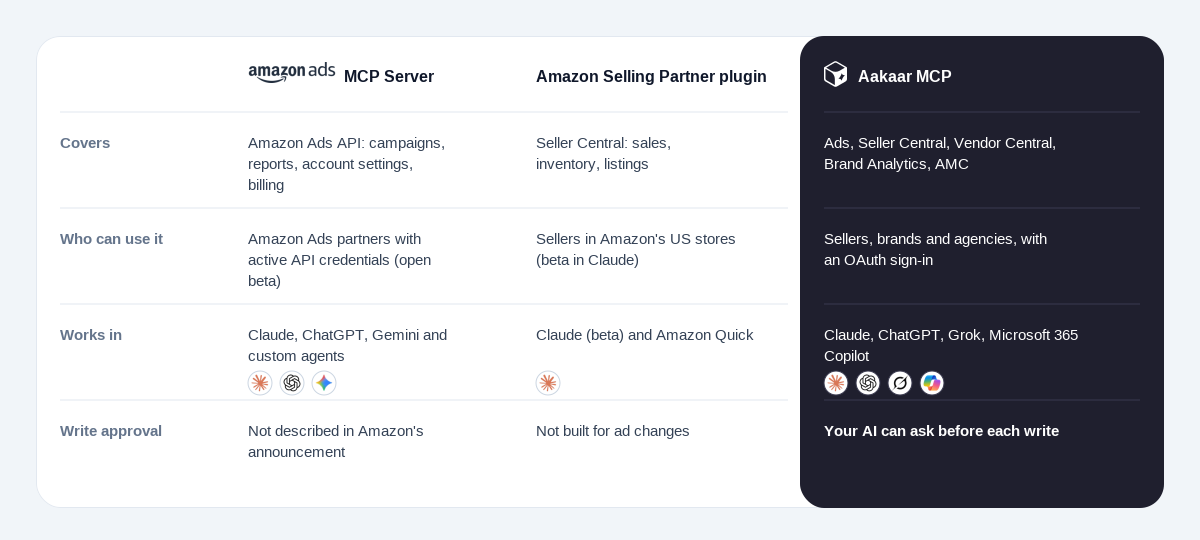
Amazon's server is in open beta, available globally to Amazon Ads partners with active API credentials. Amazon's announcement is clear about what agents can do, but it does not describe permission scopes or approval controls. The one review step it mentions is a Sponsored Products tool whose campaign "only needs review and approval."
So with Amazon's server, the approval layer is something you or your software provider has to build.
The Selling Partner plugin is a different product. It connects Seller Central data such as sales, inventory and listings to Claude and Amazon Quick, in beta for sellers in Amazon's US stores (Amazon's plugin page). It is not an ad management tool. We compare the options in Amazon seller MCP vs Aakaar MCP, and explain who can use Amazon's server in What is the Amazon Ads MCP Server?
How does Aakaar MCP handle read and write access?
Here is how Aakaar MCP handles read and write access. The AI reads freely, and your AI assistant can ask you before it makes a change. That is "human in the loop" in Amazon PPC: the AI does the analysis, and you make the call.
- You ask in plain English, for example "Which campaigns wasted spend last week?"
- The AI reads your Ads and sales data.
- It proposes specific changes, such as lowering three bids.
- You review them and approve or reject each one.
- Your AI can ask before a change runs, and Aakaar logs tool calls.
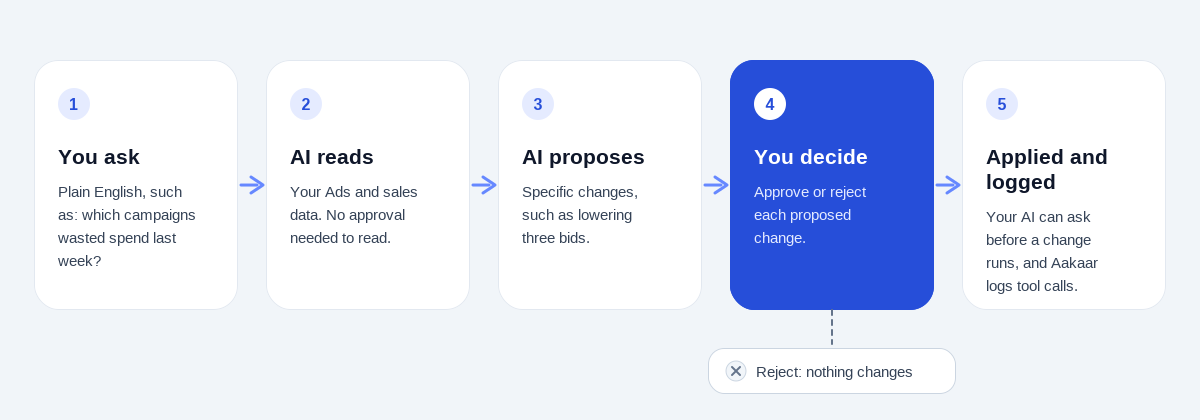
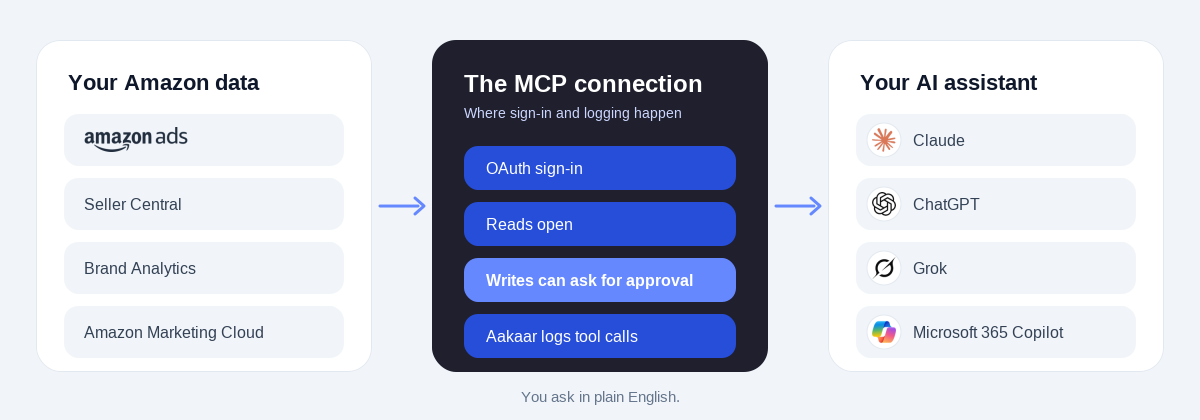
This is the approach Aakaar MCP is built around. Reads are open. Our tools are labelled as read or write, so your AI assistant can ask you before a write, and our tool instructions tell the AI to show you the exact change first. Aakaar logs tool calls. The approval comes from your AI assistant, not from Aakaar's server, so keep your assistant's approval prompt on for write tools and do not set it to always allow. Always read the change before you approve it, because an approved bid or price goes live straight away. Here is what we can say about how it works today, so check it against the checklist below:
- You sign in with OAuth from the connector settings, so there is no API key to paste.
- Your identity comes from the signed-in session, not from a prompt, and the tools only return data for the Amazon profiles on your account.
- Aakaar logs tool calls, including writes, so you can keep track of changes.
A safety checklist before you connect any Amazon MCP
Use this with any provider, ours included.
| Check | What good looks like | Red flag |
|---|---|---|
| Sign-in | OAuth, scoped, revocable | A long-lived key pasted into a config file |
| Writes | Your AI can ask you to approve each change | The AI changes bids on its own |
| Scope | Only the data the job needs | Billing and settings access by default |
| Audit trail | Ask the provider for a log of tool calls and changes | No record of who changed what |
| Change history | You can see what changed and when | No change history |
| Data separation | Each account kept apart | Customer data mixed together |
How do I connect Claude to Amazon Ads safely, step by step?
Connecting takes minutes. Spend the first week on reads.
- Add the connector in Claude. Open the connectors settings, choose "Add custom connector" and paste the server URL. For Aakaar MCP that is one URL, mcp.aakaarai.com/mcp. ChatGPT needs Developer mode on first.
- Sign in with OAuth. There are no API keys to paste.
- Start with read prompts. Ask for spend, ACOS and search terms. Check a few numbers against the Ads console.
- Try one small change. Ask for a single bid change and watch the approval step. Approve one, reject one.
- Check the change history in the Ads console after the first week, before you give the connection more work.
When is Aakaar the right fit, and when is it not?
We would rather you pick the right tool than the wrong one.
Aakaar is a good fit if:
- You want Ads, Seller Central, Brand Analytics and Amazon Marketing Cloud (AMC) data in one connection inside Claude or ChatGPT.
- You want a person to approve every change, as a rule.
- You manage more than one Amazon account and want to switch between them in one connection.
Aakaar is not the right fit if:
- You want an AI to change bids with no approval at all. Aakaar's tools are built to show you each change first.
- You are an Amazon Ads partner with API credentials building your own agents. Amazon's server may suit you better.
- You only need Seller Central data in Amazon's US stores, which Amazon's plugin covers.
- Your company requires a security certification or third-party audit report. We do not list one on our site, so ask us before you connect.
The takeaway for sellers and agencies
Treat an Amazon MCP like a new team member with access to your ad account. Give it the least access that works, make it ask before it changes anything, and keep a record. Do that, and connecting Claude is a reasonable risk. Agencies should also decide who on the team approves changes for each client. New to the basics? Read What is MCP for Amazon sellers?
Want to see the approval step on your own account? Start your free trial. It runs 14 days with no credit card.